
WooCommerce Free Delivery Over a Certain Amount: Boost Sales with Strategic Shipping Incentives
In the world of eCommerce, shipping charges often act as a barrier to conversions. Many potential customers abandon their carts when they see added delivery costs at checkout. A proven strategy to combat this challenge is offering free shipping for orders exceeding a specified amount. WooCommerce makes it seamless for store owners to implement this tactic and drive higher sales while enhancing the customer experience.
In this blog, we’ll explore the benefits of free delivery thresholds, how to set them up in WooCommerce, and practical strategies to maximize their effectiveness.
Why Offer Free Delivery Over a Certain Amount?
Free shipping thresholds incentivize customers to spend more by eliminating delivery fees when their cart value meets a predefined minimum. Here’s why it’s an effective strategy:
1. Increase Average Order Value (AOV)
Customers are motivated to add more items to their cart to qualify for free shipping, directly boosting your revenue.
2. Reduce Cart Abandonment
Unexpected shipping costs at checkout are a common reason for cart abandonment. Offering free delivery minimizes this friction.
3. Enhance Customer Satisfaction
Free shipping is a powerful value proposition that enhances the overall shopping experience and fosters loyalty.
4. Competitive Advantage
In a crowded marketplace, offering free delivery can set your store apart from competitors.
How to Set Free Shipping Thresholds in WooCommerce
WooCommerce provides built-in functionality to configure free shipping thresholds. Follow these steps to enable and customize this feature:
Step 1: Navigate to Shipping Settings
From your WordPress dashboard, go to WooCommerce > Settings > Shipping.
Step 2: Create a Shipping Zone
Shipping zones define where your free delivery offer applies. For example, you can create zones for specific countries, regions, or postal codes.
- Click on Add Shipping Zone.
- Name your zone and specify the locations it covers.
Step 3: Add Free Shipping Method
Within the shipping zone, add a new shipping method:
- Click on Add Shipping Method and select Free Shipping.
- Configure the method to apply only when the minimum order amount is met.
Step 4: Set the Minimum Order Threshold
In the free shipping method settings, define the minimum order value customers must reach to qualify for free delivery.
Step 5: Customize Messages
Display a message on product pages, cart pages, or during checkout to inform customers about the free shipping threshold. Example:
“Add $20 more to your cart to enjoy free shipping!”
Step 6: Test Your Setup
Simulate purchases to ensure the free shipping feature activates correctly when the threshold is met.
Strategies to Maximize the Impact of Free Shipping
Free delivery thresholds are most effective when strategically implemented. Here are some tips:
1. Promote the Offer Prominently
Highlight the free shipping threshold on your homepage, product pages, and banners. Visibility is key to motivating customers to aim for the threshold.
2. Use Dynamic Messages
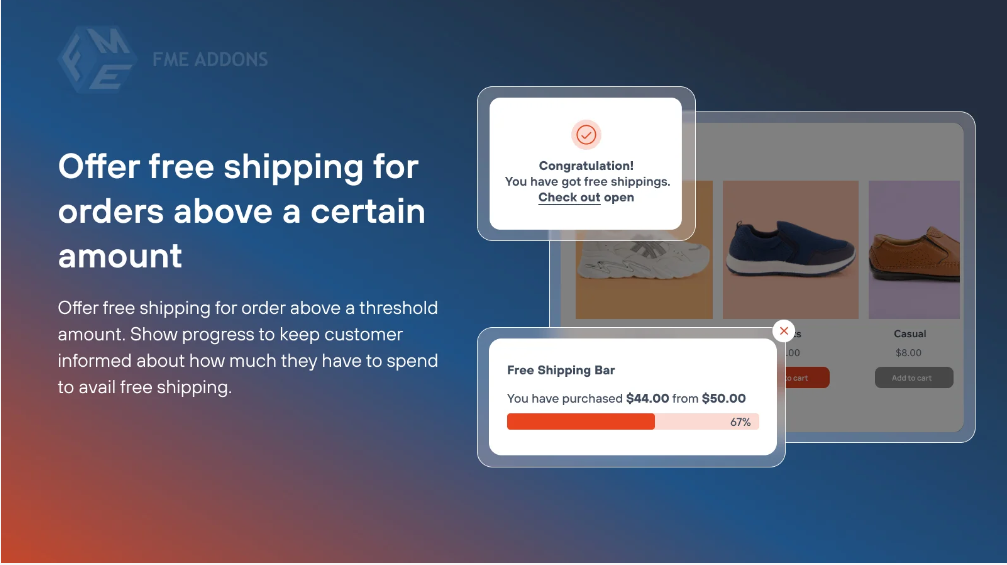
Integrate dynamic cart messages that show how much more a customer needs to spend to qualify for free delivery. For example:
“You’re just $15 away from free shipping!”
3. Upsell and Cross-Sell
Suggest complementary products or add-ons that customers can purchase to meet the threshold. Use tools like WooCommerce product recommendations to automate this process.
4. Align Threshold with Profit Margins
Ensure the minimum order amount is high enough to cover shipping costs without eating into your profit margins.
5. Create Tiered Incentives
Introduce multiple shipping offers to appeal to a wider audience. For instance:
- Free delivery for orders over $50.
- Free express shipping for orders over $100.
6. Time-Sensitive Promotions
Create urgency by running limited-time free shipping promotions, especially during peak shopping seasons or sales events.
Plugins to Enhance Free Shipping Functionality
While WooCommerce’s built-in features are robust, plugins can add advanced functionality:
1. Advanced Free Shipping
This plugin allows you to create complex rules for free shipping, such as combining cart weight, product categories, and customer roles.
2. Conditional Shipping and Payments
Restrict or enable free shipping based on specific conditions like payment methods or product types.
3. Cart Notices for WooCommerce
Display custom messages in the cart to encourage customers to meet the free shipping threshold.
Benefits for Store Owners
1. Improved Customer Retention
Free shipping offers create a positive shopping experience, increasing the likelihood of repeat purchases.
2. Increased Sales Volume
Encouraging customers to spend more to qualify for free delivery leads to higher average order values.
3. Streamlined Operations
Shipping incentives help balance inventory by encouraging the purchase of slower-moving products.
4. Competitive Edge
A free shipping offer is often the deciding factor for customers choosing between similar online stores.
SEO Benefits of Free Shipping Offers
Incorporating free shipping into your store’s strategy can also boost your SEO efforts:
1. Higher Click-Through Rates (CTR)
Promotions like “Free shipping on orders over $50” in your meta descriptions can drive more traffic to your site.
2. Increased Engagement Metrics
Free shipping offers reduce bounce rates and increase the time customers spend exploring your store.
3. Improved Conversion Rates
When customers find compelling offers, they’re more likely to complete purchases, which improves your store’s SEO ranking.
4. Enhanced Social Sharing
Customers often share free shipping deals, increasing your brand’s reach organically.
Challenges and Solutions
1. Balancing Costs
Offering free shipping can cut into profit margins if not planned carefully. Use accurate cost analysis and set thresholds that balance profitability and customer appeal.
2. Communicating Effectively
Failure to communicate free shipping thresholds clearly can lead to confusion and cart abandonment. Always use prominent and straightforward messaging.
3. Addressing International Shipping
Free shipping may not be viable for international orders. Use WooCommerce’s shipping zones to apply the offer only to specific regions.
Conclusion
Free Shipping Over Amount WooCommerce is a powerful tool to increase sales, enhance customer satisfaction, and gain a competitive edge. When implemented strategically, this incentive not only boosts average order value but also fosters long-term loyalty among your customers.
WooCommerce’s flexible shipping settings and third-party plugins make it easy for store owners to create tailored free shipping offers that align with their business goals.
By promoting your free shipping threshold effectively and continuously optimizing your strategy, you can transform this feature into a cornerstone of your eCommerce success. Start leveraging this today and watch your store thrive!